
How to Detect Hidden Cameras: A Step-by-Step Privacy Check
Learn how to detect hidden cameras in hotels, Airbnbs, homes, changing rooms, and unfamiliar private spaces using visual checks, your phone, Wi-Fi and Bluetooth scans, infrared checks, magnetic-field review, and safe documentation with LensWise.
// Quick answer
Use several checks together
Hidden cameras can be concealed inside ordinary objects such as alarm clocks, smoke detectors, USB chargers, mirrors, lamps, Wi-Fi devices, hooks, and wall decor. LensWise is built to help Android users check these spaces with a calm, repeatable flow instead of guessing what to inspect next.
- Start with a slow visual inspection guided by a clear room checklist.
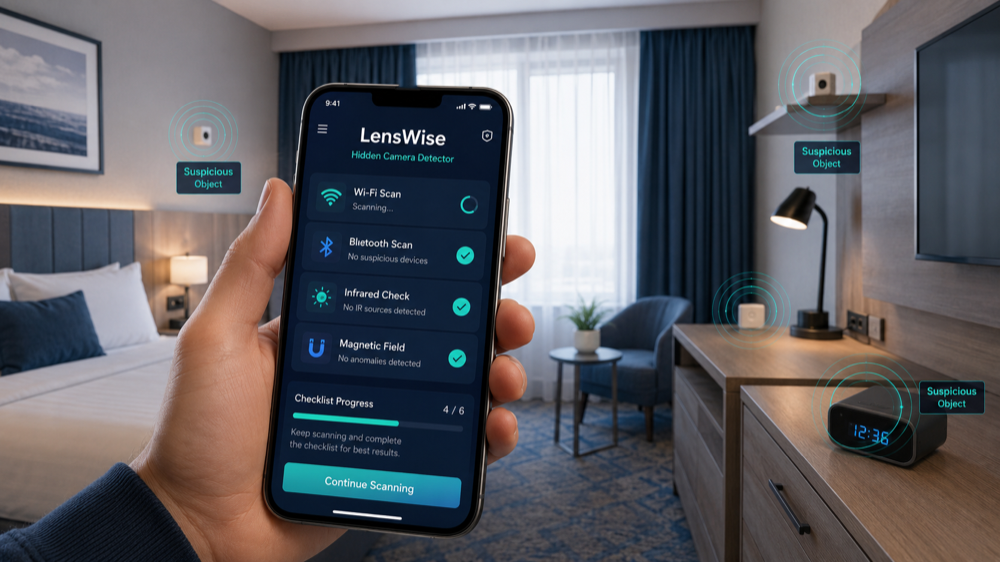
- Use LensWise to move through visual, flashlight, infrared, Wi-Fi, Bluetooth, LAN, and magnetic checks in order.
- Prioritize objects facing beds, bathrooms, changing areas, desks, and seating areas.
- Save notes or a report if something deserves a closer look.
- Escalate to the hotel, rental platform, property manager, or local authorities if you feel unsafe.
A better scan is a more organized scan
// Phone checks
Can a phone detect hidden cameras?
Yes. A smartphone can be a useful hidden camera detection tool when the inspection is structured. LensWise uses your Android phone to combine camera, flashlight, Wi-Fi, Bluetooth, local network, checklist, and magnetic-field checks in one guided room safety workflow.
LensWise helps you check
- Guided visual inspection of common hiding places
- Flashlight-assisted checks for reflective camera lenses
- Infrared observation through a compatible phone camera
- Nearby Wi-Fi, local network, and Bluetooth review
- Magnetic-field checks on supported Android phones
- Scan history and PDF reports for personal records
LensWise works best when
- You inspect the room before unpacking or settling in.
- You follow the full guided workflow instead of relying on one quick scan.
- You review suspicious placement together with app findings.
- You document concerning objects before moving or unplugging them.
- You use the app as a privacy routine for hotels, Airbnbs, rentals, offices, and private spaces.
- You repeat the check when a room layout or device placement changes.
The important point is not to become a surveillance expert. The important point is to inspect the right places in the right order. LensWise turns that process into a checklist you can follow in hotels, Airbnbs, rentals, changing rooms, offices, and private spaces.
// Detection methods
7 practical ways to detect hidden cameras
Use these methods in order when possible. LensWise helps make that order practical: start with physical placement and viewing angles, then add phone-assisted checks and save anything suspicious for later review.
1. Perform a visual inspection
A careful visual inspection should always be your first step. Walk slowly around the room and ask whether each object needs to be there, whether it is aimed at a private area, and whether it has a tiny hole, unusual wire, indicator light, or unnatural angle.
- Smoke and carbon monoxide detectors
- Alarm clocks and digital clocks
- USB chargers, power adapters, outlets, and power strips
- Wi-Fi routers, range extenders, speakers, and TV boxes
- Picture frames, wall decorations, shelves, lamps, and light fixtures
- Air vents, ceiling fixtures, hooks, tissue boxes, mirrors, and desk accessories
Do not dismantle electrical equipment or touch exposed wiring. If an object appears unsafe or suspicious, document it and contact the property manager or local authorities.
2. Use a flashlight to find lens reflections
Camera lenses are made of glass or similar reflective materials. In a dark room, a focused beam of light may produce a small, bright reflection.
- 1Close the curtains or blinds.
- 2Turn off the room lights.
- 3Hold a flashlight or your phone flashlight close to eye level.
- 4Slowly sweep the light across suspicious objects.
- 5Change your viewing angle as you scan.
- 6Look for a tiny reflection that moves or becomes brighter as your angle changes.
Reflections can also come from screws, polished plastic, glass, LEDs, and decorative surfaces. A reflection is a reason to inspect closer, not proof.
3. Use your phone camera to check for infrared light
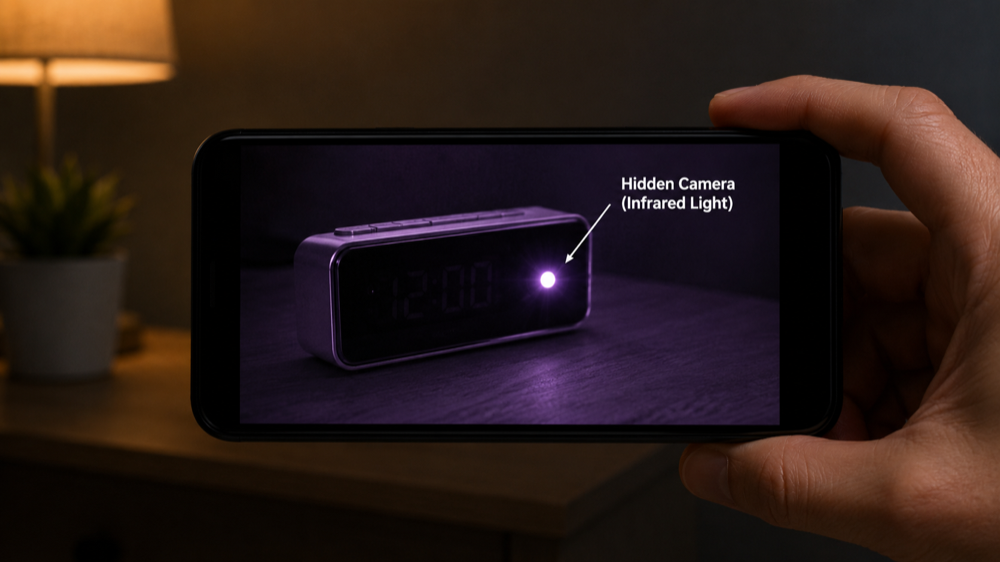
Some cameras use infrared illumination for night recording. LensWise turns this into a simple phone-camera check so you can review suspicious electronics without needing technical expertise.
- 1Open your phone camera and point a TV remote at it.
- 2Press several buttons on the remote.
- 3If you see a flashing white or purple light, use that camera for the room check.
- 4Test both the front and rear cameras and use the one that shows the signal more clearly.
- 5Darken the room and scan smoke detectors, clocks, chargers, electronics, shelves, and ceiling fixtures.
Treat infrared findings as prompts for closer inspection. LensWise helps keep that result in context with other room-safety checks.
4. Scan devices on the local Wi-Fi network
Some wireless devices appear on the local network. LensWise helps you review nearby network devices in plain language and decide whether an unfamiliar result deserves attention.
- Look for unfamiliar camera, IoT, streaming, or smart-device names.
- Compare network findings with objects that face beds, bathrooms, desks, or seating areas.
- Use the result as a prompt for a closer physical inspection instead of a standalone conclusion.
Network scanning is strongest when paired with visual checks, which is why LensWise keeps both in the same room-check workflow.
5. Check for suspicious Wi-Fi hotspots
Nearby Wi-Fi names can offer useful context during a room check. LensWise helps you include Wi-Fi review without turning the inspection into a technical diagnosis.
- Watch for camera-related names, generic IoT names, long strings of letters and numbers, or networks with unusually strong signal strength inside your room.
- If a suspicious network disappears when a concerning object is unplugged, document that timing and location.
- Hotels and apartment buildings may have many legitimate access points, so unfamiliar names are not automatically dangerous.
Do not attempt to connect to, access, or interfere with a network that does not belong to you.
6. Scan for nearby Bluetooth devices
Bluetooth review can reveal nearby smart devices or accessories worth checking. In LensWise, this becomes one more guided step rather than a separate technical chore.
- Move slowly around the room and watch whether a device signal becomes stronger near clocks, chargers, lamps, mirrors, or furniture.
- Look for unknown devices in close range, generic names, repeated devices that follow your movement, or unexpectedly strong signals near one object.
- Use Bluetooth results to decide which nearby object deserves a closer physical inspection.
Nearby rooms and normal accessories can appear in Bluetooth results. Use LensWise to keep the result tied to the room and object you are inspecting.
7. Check for unusual magnetic-field readings
On supported Android phones, LensWise can help you check for unusual magnetic activity near suspicious objects as part of the same room-safety routine.
- Move the phone slowly around a suspicious item and watch for a repeatable increase in the reading.
- High readings may be caused by electrical wiring, speakers, motors, metal furniture, chargers, magnets, or normal household electronics.
- Use repeatable changes near the same object as a prompt for closer inspection.
Magnetic scanning works best as one layer in the LensWise inspection flow.
// Travel stays
How to check a hotel room or Airbnb
When entering a hotel room, vacation rental, changing room, or unfamiliar apartment, prioritize areas where privacy is expected. LensWise is especially useful here because it gives tired travelers a checklist to follow before unpacking.
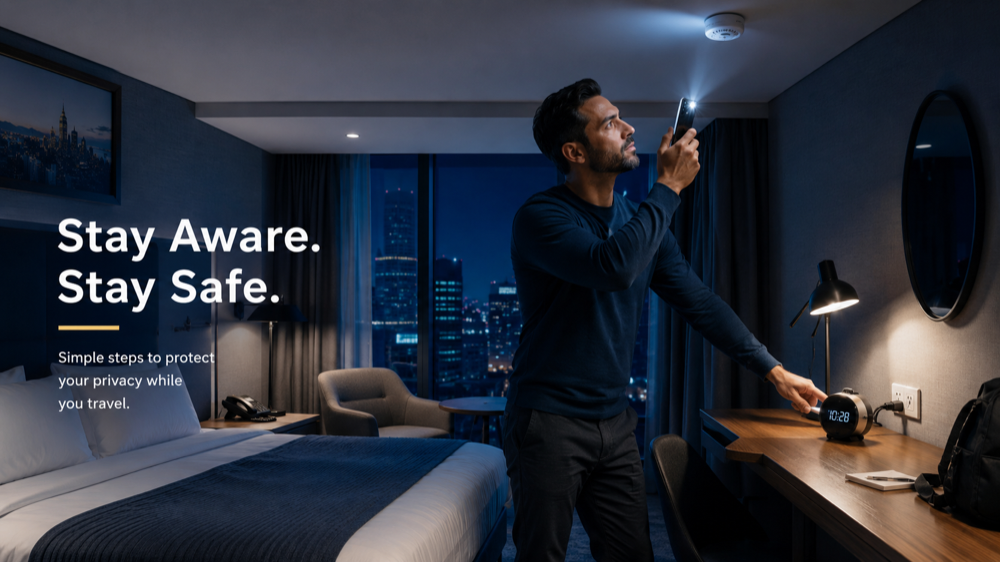
- 1Inspect before unpacking, especially when you are tired from travel and tempted to rush.
- 2Stand at the bed, shower, toilet, desk, sofa, or changing area and look outward from that privacy zone.
- 3Check high and low positions: ceiling fixtures, vents, shelves, bedside tables, outlets, wall decor, and objects under furniture.
- 4Inspect powered objects, duplicate chargers, unexplained USB cables, unusually large adapters, and wires disappearing behind furniture.
- 5Investigate results that point to the same object from more than one method, such as suspicious placement plus a reflection or strong signal.
Visible security devices may be allowed in some shared or exterior spaces depending on local law and platform policy, but hidden recording devices in private areas are a serious concern. If you see something unusual, LensWise reports can help you keep a record of what you checked and where it appeared.
// Common hiding places
Where hidden cameras are commonly placed
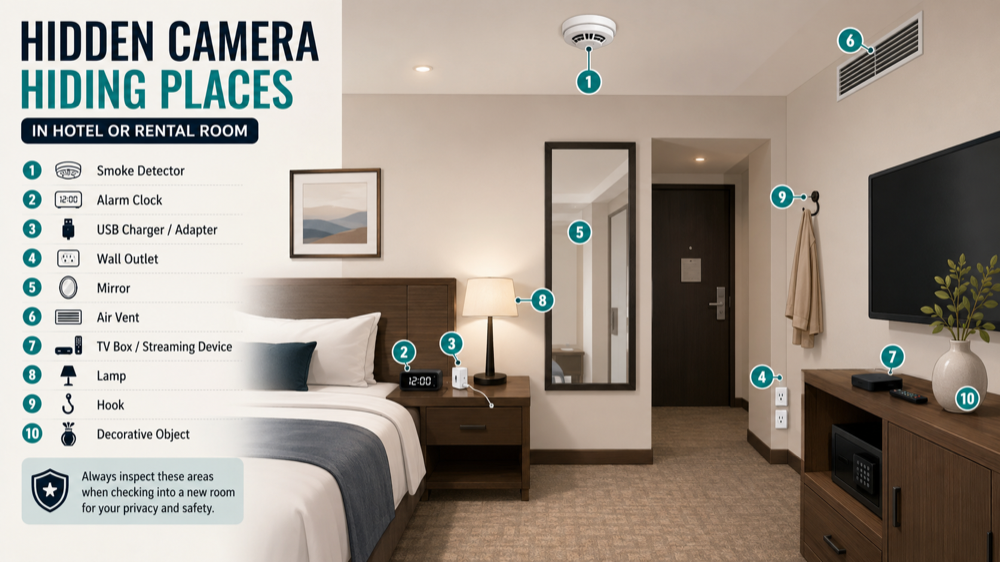
Hidden cameras are generally positioned where they have a clear view while remaining close to a power source, stable surface, or believable object. Check anything aimed at private areas before you inspect random objects. LensWise includes common hiding-place prompts so the scan feels less like guesswork.
Bedroom
Alarm clocks, USB chargers, smoke detectors, lamps, TV equipment, picture frames, air vents, and anything facing the bed.
Bathroom
Exhaust vents, ceiling fixtures, hooks, mirrors, tissue boxes, shelves, outlets, and anything facing the shower or toilet.
Living room
Speakers, routers, TV boxes, decorative objects, bookshelves, air purifiers, clocks, and anything facing seating areas.
Office or meeting room
Power strips, chargers, pens, clocks, conference equipment, smoke detectors, network devices, and objects aimed at screens or desks.
Changing room
Hooks, mirrors, ceiling fixtures, ventilation openings, signs, wall decorations, shelves, and gaps between panels.
Avoid unsafe handling
// False shortcuts
Hidden camera detection tricks you should not rely on
Some popular online tricks are too unreliable to use as proof. They can distract from better evidence such as suspicious placement, lens reflections, infrared sources, repeatable scanner results, and documentation.
The mirror fingertip test
A gap, or no gap, between your fingertip and its reflection cannot reliably prove whether a mirror is two-way. Mirror construction varies. Inspect the installation, edges, lighting, wall, and any accessible space behind it instead.
Phone-call interference
Static or poor call quality can come from network coverage, building materials, electrical interference, or nearby phones. It is not a reliable hidden-camera test.
A single Wi-Fi result
An unknown device on a shared network may be a television, router, thermostat, speaker, hotel system, or another guest's device. Look for agreement between several clues before treating it as suspicious.
Apps that promise 100% detection
Be cautious with exaggerated promises. A trustworthy detector app should guide several practical checks, explain results clearly, and help you decide what deserves closer attention.
// Detector apps
Do hidden camera detector apps really work?
Hidden camera detector apps are most useful when they organize several phone-based checks into a clear process. That is the core LensWise use case: help you inspect the room more completely, remember what you checked, and keep a record when something looks suspicious.
- Local network scanning
- Nearby Wi-Fi inspection
- Bluetooth scanning
- Infrared observation
- Flashlight-assisted lens scanning
- Magnetic-field measurement
- Room checklists
- Detection history and reports
LensWise for Android combines guided room checks with Wi-Fi, local network, Bluetooth, infrared, magnetic-field, and visual inspection tools. It also supports history reports and PDF export, which is useful for travel records, hotel conversations, rental-platform reports, or your own peace of mind.
Why use LensWise instead of guessing?
// Next steps
What to do if you find a suspicious camera
Finding a possible hidden camera can be stressful. Avoid acting impulsively. Your safety and documentation matter more than proving everything on the spot.
- 1Do not dismantle, open, or damage the object. You could destroy evidence, expose yourself to electrical hazards, or complicate an investigation.
- 2Photograph or record the full room, the object's position, its viewing direction, close-up details, nearby cables, and scanner results with timestamps.
- 3Move to a safer location if you feel unsafe. Avoid discussing your discovery where the suspected device may record audio.
- 4Contact the appropriate party: local law enforcement, hotel management, the rental platform, the property owner, or a privacy professional.
- 5Preserve photos, booking details, host or hotel messages, receipts, scan screenshots, and incident report numbers.
Privacy and surveillance laws vary by country, state, and region. Local authorities can advise you on the correct reporting process.
// FAQ
Frequently asked questions
Can a cell phone detect a hidden camera?
Yes, a phone can be a useful hidden camera detection tool when it combines guided visual inspection, lens-reflection checks, infrared observation, Wi-Fi review, Bluetooth scanning, and magnetic-field checks. LensWise brings those checks into one step-by-step Android workflow.
How can I find a hidden camera using my phone flashlight?
Darken the room and hold the flashlight close to eye level. Slowly scan suspicious objects and watch for a small, sharp reflection that changes as you move. Glass, metal, screws, and LEDs may also reflect light, so inspect any result carefully.
Can hidden cameras work without Wi-Fi?
Yes. That is why LensWise does not rely only on Wi-Fi. It also guides visual inspection, flashlight lens checks, infrared observation, Bluetooth review, LAN review, and magnetic-field checks.
Can a hidden camera record when the lights are off?
Some cameras use infrared night vision and can record in darkness. Infrared-equipped cameras may produce white, pink, or purple dots when viewed through a compatible phone camera.
Where should I look for hidden cameras in a hotel?
Prioritize objects facing the bed, bathroom, shower, seating area, or desk. Common places include smoke detectors, clocks, chargers, TV equipment, lamps, air vents, outlets, hooks, mirrors, and decorative objects.
Are unknown devices on Wi-Fi always hidden cameras?
No. Unknown devices may be normal hotel or home electronics. LensWise helps you treat Wi-Fi results as one clue and compare them with room placement, visual inspection, Bluetooth findings, and other checks.
Can Bluetooth scanning find spy cameras?
Bluetooth scanning can reveal nearby smart devices or accessories that deserve a closer look. LensWise keeps Bluetooth review in context with visual inspection, Wi-Fi review, infrared checks, and suspicious object placement.
Are magnetic hidden camera detectors accurate?
Magnetic-field checks are most useful as part of a guided routine. LensWise helps you use them as one signal alongside visual, Wi-Fi, Bluetooth, infrared, and lens-reflection checks.
What is the most reliable way to detect hidden cameras?
The most practical approach is a repeatable, layered room check. LensWise is designed for exactly that: a guided inspection that combines common hiding-place checklists with phone-based scanning tools and report history.
// Wrap up
Protect your privacy with a repeatable room check
Hidden cameras are designed to blend into ordinary surroundings, but they still need a useful position, a believable hiding place, and some way to record or send information. LensWise helps you check those practical clues without needing to understand the underlying electronics.
- Look for suspicious placement.
- Search for lens reflections.
- Check for infrared lights.
- Review nearby wireless devices.
- Investigate repeatable signals.
- Save a LensWise history report or PDF when something looks suspicious.
- Seek professional help when the risk is serious.